
Delete an Earn Rule
To keep your Loyalty instance uncluttered, the best practice recommendation is to delete unneeded or test Earn Rules. The deletion process is permanent and irrevocable; you can’t later restore a deleted Earn Rule.
Note: Loyalty includes several "system" Earn Rules that are part of every Loyalty instance. System rules are identified by the suffix "(system)" appended to the Earn Rule name. System Earn Rules can't be deleted.
To delete an Earn Rule:
-
Select Rules from the top navigation bar, then select Earn Rules from the side navigation menu. The Earn Rules screen is displayed.
-
Optionally, search for the desired Earn Rule (see
-
Optionally, expand an Earn Rule Group by clicking the Expand icon next to its name.
-
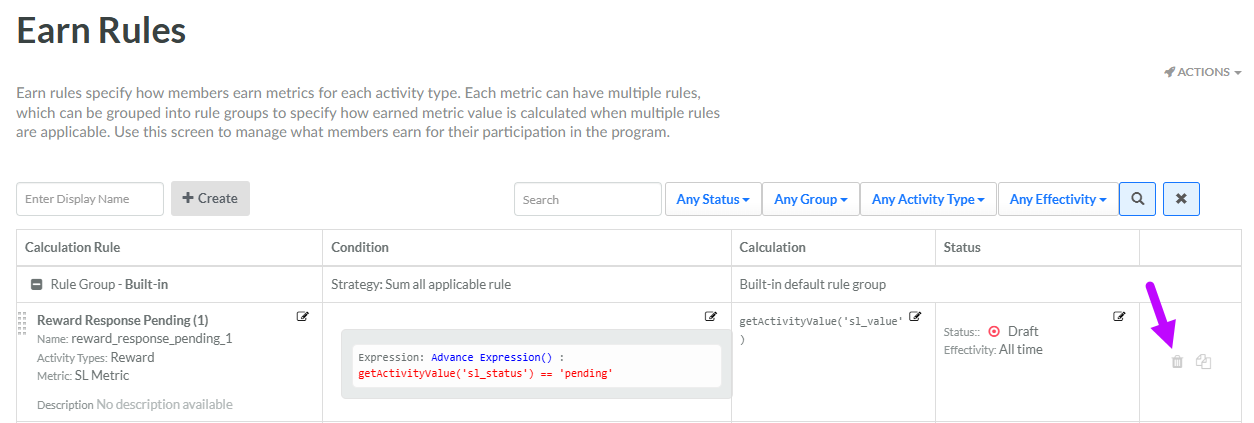
Next to the desired Earn Rule, click the Delete icon. A confirmation dialog box is displayed; click Confirm.
If this Earn Rule had a status of Published, you must deploy metadata in order for the changes to take effect. See Deploy Earn Rule Metadata for more details on this process.
